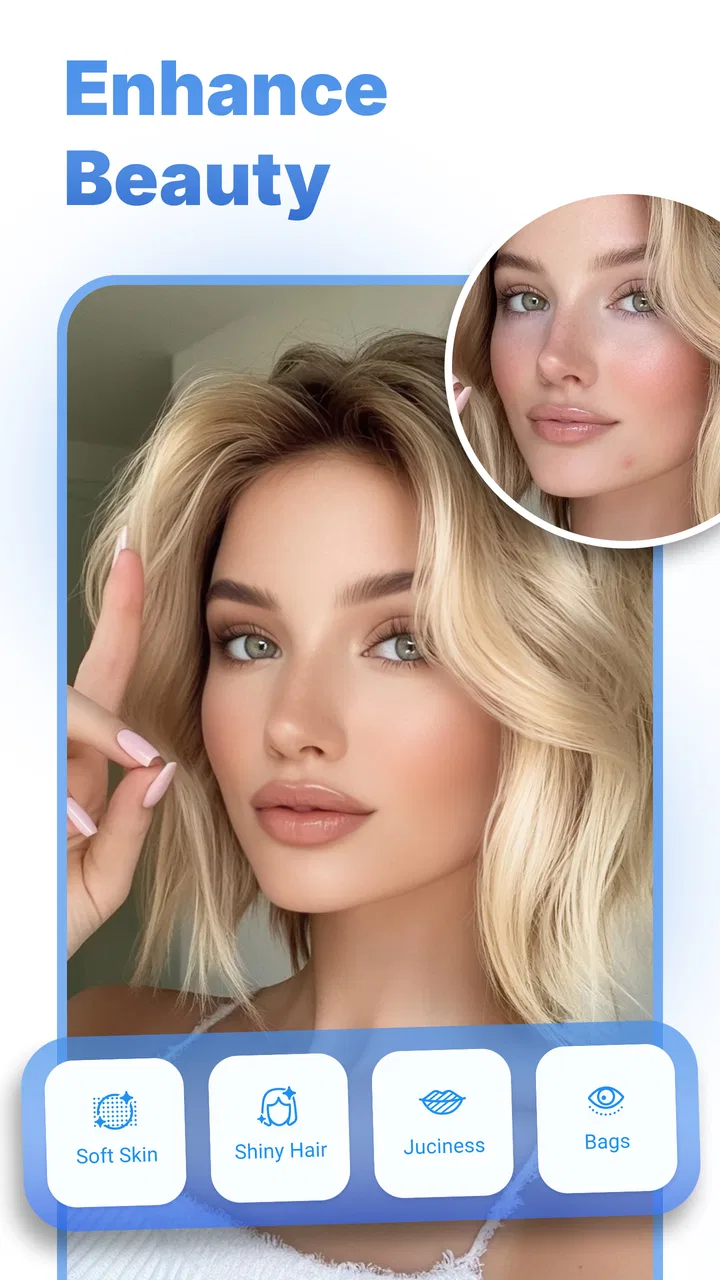
Facelab - Selfie Face Editor
- 4.1
- Rating
- 1.00M
- Installs
- Free
- Price

 Analysis by App-foxy
I usually judge a photo editor by what happens after the first tap: can I get from an ordinary selfie to a believable result without fighting the interface? Facelab - Selfie Face Editor is built for that exact moment. It is a free photography app from IRONTECH, focused on face editing, body retouching, beauty filters, makeup adjustments, and selfie tools. I found it most useful when I wanted a quick improvement rather than a full editing session with layers, masks, and color curves.
The app has a 4.1 average from around 12 thousand ratings and has passed one million installs, so it is clearly aimed at a broad audience rather than professional photographers. That positioning makes sense in daily use. Facelab is approachable, but its convenience comes with trade-offs: automatic retouching can look too strong, some editing choices take patience to undo, and the best results depend heavily on the original image.
Getting past the first points of friction
I find the easiest way to get comfortable with Facelab is to treat the first edit as a small test, not a makeover. Pick a clear portrait, change one thing, and compare it with the original before deciding whether to continue; that makes it much easier to tell what the tool actually improved. Once that feels familiar, the next section looks at how to get useful results without letting convenience turn into over-editing.
You May Also Like

 Blood Strike: 2.5 Anniversary
Blood Strike’s Loadouts Turn Every Drop Into a Tactical Gamble
A close look at Blood Strike’s custom loadouts: how fast access to signature weapons reshapes its battle royale rhythm, rewards preparation, and narrows the gap between fights.

 Pandora - Music & Podcasts
Pandora’s Music Is Easy to Start, but Harder to Recover
Pandora’s strength is its low-effort path from a seed to a station. Its weak spot is how much confidence it asks you to place in connection, setup, and quiet recovery.

 8 Ball Pool
 Is Built on Rivalries, Rematches, and Routine
A close look at the rivalries, rematches, shared routines, and unanswered safety questions that turn a quick pool match into a persistent mobile community.

 Samsung Music
’s Quiet Strength Is Playing What You Already Own
Its reach comes less from spectacle than from dependable access to a personal library. That simplicity is both the app’s strongest retention engine and its ceiling.

 AccuWeather: Weather Radar
AccuWeather Review: A Quick, Clear Forecast for Everyday Decisions
For everyday plans, the best forecast is the one you can understand quickly. AccuWeather makes rain timing, radar, and local conditions easy to act on, with a few trade-offs.

 Hill Climb Racing
Why Hill Climb Racing Still Turns Crashes Into One More Run
A tiny car, a bumpy hill and one more upgrade: Hill Climb Racing keeps resurfacing because its simple chaos makes every near-miss feel personal.
More From Our News Desk



Why the first edit can feel less simple than expected
The main difficulty is not understanding what a face editor is supposed to do. It is choosing how much correction is enough. Facelab presents the kind of tools people expect for selfies, but a portrait can quickly move from polished to artificial when several adjustments are applied together. I recommend starting with one change at a time, especially if the photograph already has good lighting.
A common mistake is opening an image and immediately applying a strong beauty effect. That approach hides which adjustment changed the face, skin, or proportions. Instead, I first inspect the unedited picture, make a small correction, and then compare the result with the original before continuing. This simple pause is more valuable than endlessly increasing every slider or effect.
The app is aimed at everyday users, not at people who need precise professional retouching. If you want a fast profile picture, a cleaner selfie, or a playful transformation, that focus works in its favor. If you need exact control over individual pixels, consistent commercial portraits, or a carefully matched series of images, a desktop editor or a more advanced mobile editor is likely a better fit.
Setup checks that prevent avoidable problems
Facelab runs on operating systems from version 10 onward, and the current release is 3.47. Before blaming the app for a failed import or an unstable editing session, I would check that the phone meets that requirement and has enough free space for the image and the app to work comfortably. Large photos, several open apps, or an older device can make any editor feel unresponsive.
I also recommend beginning with a copy of an important photograph. This is not because the app is inherently unsafe; it is simply good editing practice. A duplicate lets me experiment with reshaping, makeup, or stronger beauty effects without worrying about losing the untouched original. It also makes comparison easier when the finished image looks different from what I expected.
When an image does not appear in the picker, I first check whether it is actually stored on the device and whether the phone's photo access settings allow the app to see it. If the picture exists only in a cloud gallery or inside another service, saving a local copy and trying again is a sensible general recovery step. I would avoid repeatedly tapping import while the gallery is still loading, because that can make the process look more broken than it is.
The same principle applies to saving. I keep the app open until the export has clearly completed, particularly with a high-resolution portrait. If the result is not visible immediately in the gallery, I check the gallery's recent items and the device's available storage before repeating the edit. These checks sound basic, but they answer two questions users often have: whether the image is gone and whether the app failed. In many cases, neither conclusion is justified yet.
A workflow that is easier to recover
My preferred Facelab workflow is deliberately conservative. I choose the image, make a light face or skin adjustment, preview it against the original, and only then explore makeup or body retouching. Separating those stages gives me a better idea of what each tool is doing. It also means that if the final look becomes excessive, I know which recent step to reverse rather than starting from scratch.
For a natural portrait, lighting matters more than most people expect. A bright face with visible eyes gives the editor a better starting point than a dark, heavily shadowed image. I avoid stacking a beauty filter with aggressive reshaping unless I am intentionally creating a stylized image. The strongest effects can smooth away expression and make the face appear disconnected from the lighting in the rest of the picture.
One useful habit is to zoom out before deciding that a retouch is successful. At close range, a softened area may look clean, while at normal viewing size the face can lose texture. I also inspect the hairline, jawline, shoulders, and background after body or shape adjustments. These edges are where an otherwise convincing edit can become noticeable.
Makeup tools deserve the same restraint. They can be helpful when I want to test a color or create a more deliberate social-media look, but they are not a substitute for real lighting or a carefully composed portrait. I prefer using makeup adjustments after the face structure is settled. Otherwise, I may spend time matching cosmetic effects to a shape that I later change.
If a result suddenly looks wrong, I do not keep adding corrections to compensate. I step back to the last version that looked believable and rebuild from there. This is one of the most practical ways to recover from an over-edited image. A smaller number of controlled changes usually looks better than a long chain of fixes.
When the app is not really the cause
Not every disappointing result is a software problem. A front-facing camera can introduce distortion, especially when the phone is held close to the face. That can make the nose, forehead, or jaw appear different before Facelab has made any adjustment. Moving the phone slightly farther away and keeping it near eye level can produce a more balanced source image.
Lighting can create another false diagnosis. A strong light from above may emphasize shadows under the eyes, while mixed indoor lighting can give skin an uneven color. A retouching app may reduce some of that impression, but it cannot fully recreate detail that was never captured. If the original is blurred, compressed, or badly exposed, increasing the strength of an effect often makes the flaws more obvious.
Face detection can also be affected by sunglasses, hair across the face, side angles, or several people in one frame. When an edit behaves strangely, I try a clear, front-facing portrait first. That test helps separate an image-specific limitation from a wider app issue. If a straightforward photo works normally, the original composition is probably part of the explanation.
Performance complaints need a similar check. I close demanding apps, restart the phone if the editor has been open for a long time, and try a smaller image. If only one photograph causes trouble, I convert or resave that image and test again. If every image behaves badly, checking the operating system requirement, available storage, and app update status is more useful than repeatedly changing the same edit.
There is also a privacy decision that belongs to the user rather than the editing controls. Faces are personal images, so I think about which photographs I am comfortable processing in any photo service and which I would rather keep untouched. For casual selfies this may not change my routine, but for identity documents, private family images, or sensitive work portraits, I would choose an editor and workflow whose handling terms I have personally reviewed.
What the free model means in practice
Facelab is free to install and use as an entry point, but it includes in-app purchases ranging from $2.99 to $49.99 per item. That matters because “free” does not necessarily mean every editing option is available without a payment prompt. I would explore the basic workflow first and decide whether the accessible tools are enough before considering an upgrade.
I prefer this approach because it prevents a common disappointment: paying before discovering that the app's editing style is not right for me. Someone who only needs occasional light retouching may find the free experience adequate. Someone who edits selfies frequently may value additional options, but should still judge the purchase by the controls they actually use rather than by the number of effects presented.
The Everyone content rating makes the app broadly suitable for general audiences, although that does not remove the need for sensible expectations about appearance editing. A face editor can be fun and useful, but it can also encourage unrealistic comparisons if every image is altered heavily. I get the best value when I treat the edits as creative choices or small corrections, not as a requirement to make every photo look identical.
How it compares with familiar alternatives
Compared with a standard phone gallery editor, Facelab is more focused on faces, beauty changes, makeup, and body retouching. A built-in editor is often better for cropping, rotating, exposure, and quick color corrections, but it usually does not make portrait-focused changes the center of the workflow. For a selfie that needs more than brightness and contrast, Facelab is the more direct option.
Compared with a full professional editor, Facelab is faster to approach but less suitable for precision work. I would choose a professional-style tool when I need layers, selective masking, repeatable adjustments, or detailed control over a complicated image. Facelab wins when the goal is a quick personal result and loses when the goal is a carefully managed production workflow.
It also occupies a different space from social networks with built-in camera filters. Those filters are convenient while taking a picture, whereas Facelab is useful when I already have a photo and want to revisit it. That distinction is important for people who keep a gallery of older selfies or receive pictures from friends and want to make small changes after the moment has passed.
Who will get the most from it
I would recommend Facelab to someone who wants an accessible selfie editor with more portrait-specific options than a phone's basic gallery. It suits profile-photo updates, casual posts, experimenting with makeup looks, and preparing a single image quickly. It is especially practical for users who do not want to learn a complicated editing interface before making a small improvement.
It is less appropriate for photographers who need exact skin texture, precise retouch boundaries, or a consistent visual treatment across many portraits. I would also suggest skipping it if the main need is ordinary photo organization, detailed color grading, or collage design. Its strengths are concentrated around changing the appearance of a person in an image, not replacing an all-purpose photo management system.
For a realistic everyday example, imagine taking a quick selfie before updating a messaging profile. I would select the clearest frame, soften only the distracting areas, check the face at normal size, and stop before the result loses expression. If the image still feels flat, I would improve the original lighting or choose another frame rather than trying to repair everything with stronger effects. That workflow takes advantage of Facelab without asking it to solve problems created when the photo was taken.
My practical verdict
Facelab is at its best when speed and portrait-focused editing matter more than absolute control. I like that it gives ordinary selfies a clear editing direction instead of making me search through a large set of unrelated photographic tools. The face, body, makeup, and beauty emphasis makes sense for quick personal work, and the free starting point makes it easy to test whether its style suits me.
My main caution is to keep the editing process measured. The app can make a weak source image look more finished, but it cannot replace good lighting, a sensible camera distance, or a sharp original. When an import, save, or effect behaves unexpectedly, I first check the device, image, storage, and workflow before deciding the app is at fault. That troubleshooting habit saves time and leads to more realistic results.
IRONTECH's app is worth trying if you want a straightforward photography tool for selfies and occasional appearance adjustments. I would keep a more advanced editor alongside it for precision work, and I would not pay for extra options until the everyday workflow feels comfortable. For users who understand that restraint produces the most believable portrait, Facelab is a useful companion rather than an all-purpose replacement for every photo editor.
FAQs for Facelab - Selfie Face Editor
01What is Facelab - Selfie Face Editor used for?
Facelab - Selfie Face Editor is designed for enhancing and retouching portrait photos directly on a mobile device. It includes tools for smoothing skin, removing minor imperfections, reshaping facial features, whitening teeth, adjusting makeup, and applying filters. During testing, it felt most useful for quick social-media edits, although the final result depends on the original photo quality and how carefully each adjustment is applied.
02Is Facelab - Selfie Face Editor free to download and use?
The app can generally be downloaded without an upfront payment, but some editing tools, effects, templates, or export options may be restricted to premium users. You should check the current in-app purchase details on the Google Play Store or App Store before subscribing. A free version may be enough for basic retouching, while frequent users should carefully review trial periods, renewal terms, and cancellation instructions.
03Does Facelab require an internet connection to edit photos?
Basic editing may work with photos already stored on your phone, but certain features can depend on online processing, advertising, account services, or premium content. In practice, it is best to keep an internet connection available when opening the app, downloading effects, or exporting a finished image. Offline availability can also vary by device, operating system version, and the specific tool being used.
04Can Facelab edit both selfies and group photos?
Facelab is primarily focused on selfies and individual portraits, where its face-detection and retouching tools are easiest to control. It can also be used with group photos, but automatic adjustments may not recognize every face equally or may affect only the most prominent subject. For better results, use well-lit images with clearly visible faces and check the preview carefully before saving or sharing.
05Are photos edited with Facelab safe and private?
Before importing personal images, review the app’s current privacy policy and the permissions requested on your device. Some functions may process images locally, while others can require access to online services, depending on the feature and app version. Avoid granting unnecessary permissions, use photos you are comfortable processing, and remember that subscription, advertising, and analytics practices may change after updates.
Pros
- Quickly retouches skin
- eyes
- teeth
- and facial features.
- Offers creative filters and effects for varied selfie styles.
- Simple interface makes basic edits accessible to beginners.
- Useful tools for reshaping and enhancing portrait photos.
- Supports polished results suitable for social media sharing.
Cons
- Some advanced tools may require a paid subscription.
- Overediting can make faces look unnatural or overly smooth.
- Results depend heavily on lighting and photo quality.
- Ads may interrupt editing for users on the free version.
- Privacy details should be checked before uploading personal photos.

Facelab - Selfie Face Editor
Gallery